
DevSnipe for Chrome
The blank proposal box is where most Upwork applications stall. DevSnipe for Chrome drafts your cover letter and answers the screening questions right on the apply page, in your voice, so you spend your time reviewing instead of writing from scratch. You review, tweak, and send every draft yourself.
Add to Chrome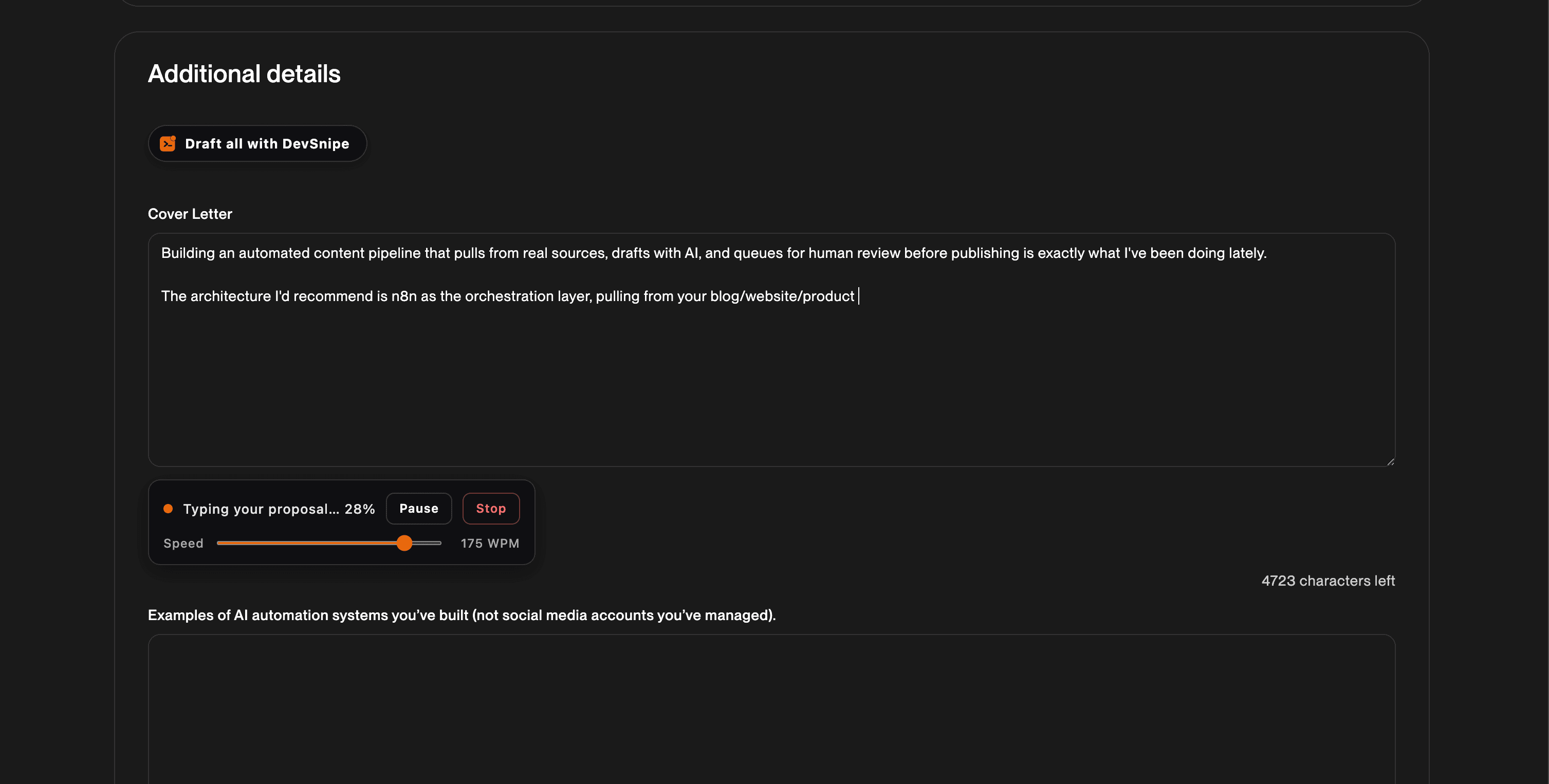
Drafts Right on the Job Page
Open a job, click Draft with DevSnipe, and it reads the full posting and writes a tailored cover letter, then types it into the proposal field for you to review.
- Written for the specific job, grounded in your real skills and past proposals so it sounds like you
- No copy-pasting between tabs, the draft lands in the real Upwork apply form
- You review and edit before anything is sent
Answers the Screening Questions
The questions under a listing are where a lot of applications die. DevSnipe drafts an answer under each one, so you can fill the whole application without switching context.
- A Draft answer control sits right under each question field
- Answers are grounded only in your real skills, never invented from the posting
- Draft All writes the cover letter and every question in one pass
Typed In at a Natural Pace
The draft is typed into the field at a speed you control, so it reads as your own work rather than a wall of pasted text. Prefer it instant? Switch to paste-at-once.
- Adjustable typing speed, or Instant mode to paste the whole draft at once
- Pause or stop mid-draft any time
- Your speed preference follows your DevSnipe account across browsers
You Stay in Control
By default the extension fills the fields and stops, leaving the send to you. It runs only on Upwork pages, and the only part of your account it touches is the application you are working on plus your Connects balance, which it reads off the apply page so it can report what an application cost you.
- Reads the public job posting you are viewing to write a relevant proposal, plus the Connects balance shown on the apply page
- Never reads your Upwork messages, billing details, or payout information
- Advanced link options can place a Connects boost bid or submit automatically, which spends real Connects, and they only run when you opt in
- Auto-submitting is a paid feature with no monthly cap. Free accounts draft and type the application, then you click Send
- Your first 5 drafts are free, then continue with your own AI provider key or DevSnipe proposal credits
Frequently Asked Questions
Does the DevSnipe Chrome extension submit Upwork applications for me?
DevSnipe's Chrome extension drafts by default and leaves the submitting to you, so you are the last set of eyes before anything sends. It fills in the cover letter and screening answers on the Upwork apply page, then stops. Opt-in link options can additionally set a Connects boost or auto-submit after a cancel window, but those only run when you explicitly enable them on the apply link. Auto-submit is a paid feature with no monthly cap on any paid plan. Free accounts get the draft typed in and click Send themselves. Every action runs in your own browser against your own logged-in Upwork session, never from a DevSnipe server.
Is the DevSnipe Chrome extension free?
The DevSnipe Chrome extension is free to install and your first 5 proposal drafts run free on DevSnipe's own AI. After that you either bring your own Anthropic or OpenAI API key and pay your provider's rate directly, or buy DevSnipe proposal credits at $1 a credit with bulk packs saving up to 30%. Auto-submit is separate and paid only. Every draft is written from that specific job posting and your own work history rather than a stored template. A free DevSnipe account is required, created by signing in with your email.
What data does the DevSnipe Chrome extension access?
The DevSnipe Chrome extension reads the public content of the Upwork job page you are currently viewing: title, description, budget, skills, and any screening questions, all of which it needs to draft a relevant proposal. On an apply page it also reads the Connects balance that Upwork displays there. It runs only on Upwork pages, and it communicates only with Upwork and DevSnipe. It does not read other sites, other tabs, or your Upwork messages. Full detail is in the DevSnipe privacy policy at devsnipe.com/privacy.
Full detail on what the extension accesses is in the privacy policy.
Draft Your Next Proposal on the Page
Add DevSnipe to Chrome, open any Upwork job, and let it write the first draft for you.